E-mail sending yuno. It speaks native SMTPS (implicit TLS, RFC 8314) and queues outgoing messages with TimeRanger2 persistence so they survive transient SMTP outages and yuno restarts. Builds fully static since 7.4.3.
Architecture
C_EMAILSENDER          <- queueing, retry, dead-letter, MIME encoding
    > C_SMTP_SESSION   <- SMTP client FSM (banner/EHLO/AUTH/MAIL/RCPT/DATA)
> C_TCP <- smtps://host:465 (implicit TLS from byte zero)C_EMAILSENDERowns two persistent queues on TimeRanger2:emails_queue(pending) andemails_failed(dead-letter). It builds the full RFC 5322 / MIME message (mime_encoder.c) and drives the send/retry loop.C_SMTP_SESSIONimplements the line-based SMTP client as an FSM. It uses AUTH PLAIN. STARTTLS is not implemented (the transport is TLS from the first byte via thesmtps://C_TCP bottom). EHLO advertises the local hostname. An idle session closed by the server (SMTP 421 — OVH does this aggressively) is treated as a graceful close. The session connects only when it has a message to send: its C_TCP never connects by itself, neither when it starts (connect_on_startfalse) nor after a close.
Configuration
Effective config is the usual merge of main.c fixed/variable config with the
external JSON. Inspect it at runtime with
ycommand command-yuno id=<id> service=__yuno__ command=view-config.
| Attribute | Default | Purpose |
|---|---|---|
url | (required) | SMTP server, for example smtps://ssl0.ovh.net:465 |
from | (required) | Default envelope/From address |
from_beautiful | "" | Optional display name for the From header |
username / password | "" | AUTH PLAIN credentials. Blank → the SMTP side does not start; set them with set-email-user |
max_retries | 4 | Max total send attempts before dead-lettering |
timeout_retry | 2000 | ms before the connection that follows a failed session or connection; doubles per failure in a row |
timeout_retry_max | 600000 | Cap of that doubling (ms) |
timeout_failing_alarm | 3600000 | ms a failing server may keep emails waiting before it is an ERROR (said again at most once per this period); 0: never |
timeout_response | 30000 | ms the server has to answer each command |
timeout_inactivity | 30000 | ms of silence after which the idle SMTP connection is closed; the next email opens it again |
disable_alarm_emails | false | Drop “ALERT Queuing” alarm emails |
tranger_path / tranger_database | TimeRanger2 store location | |
topic_emails_queue | emails_queue | Pending-queue topic |
topic_emails_failed | emails_failed | Dead-letter topic |
backup_queue_size | 1000000 | Backup the queue topic at this size |
url, from, username and password are persistent attributes: set them at
runtime with the set-email-user / set-url-from commands (below) and they are
saved to the yuno’s persistent-attrs store and reloaded on restart, over the
config values. This is the canonical way to provision the SMTP credentials: a
batch config leaves username and password blank, and they are set once with
set-email-user.
While either one is blank the SMTP side does not start. The yuno runs, accepts and queues emails, and logs one ERROR (“SMTP username or password is empty: emails are queued, NOT sent. Set them with the set-email-user command”). The command applies at once, with no restart: the session starts and the queue is sent, the emails queued while the credentials were missing included (up to 7.25.21 they waited for the next email queued).
ycommand -c 'command-yuno id=<id> service=emailsender command=set-email-user username=no-reply@example.com password=<password>'The emailsender hands timeout_retry, timeout_retry_max,
timeout_failing_alarm and timeout_response to its C_SMTP_SESSION, which
does the pacing and the per-command watchdog.
Commands
| Command | Parameters | Description |
|---|---|---|
send-email | to, subject, body, reply-to, attachment, inline_file_id, is_html | Enqueue an email. to/cc/bcc accept comma- or semicolon-separated lists. Recipients are deduplicated. |
list-queues | — | Dump the messages in emails_queue and emails_failed with totals. Works while paused (queues are opened temporarily). |
remove-emails-failed | — | Purge the emails_failed dead-letter queue. Works while paused. |
skip-email | — | Move the email at the head of emails_queue (the one being tried, which every other waits behind) to emails_failed at once, with a WARNING; answers with its to and subject. Works while paused, and while the email is in its mail transaction: the SMTP session is stopped and the next email goes on a new connection. Example: ycommand -c 'command-yuno id=<id> service=emailsender command=skip-email' |
set-email-user | username, password, url, from | Set the AUTH PLAIN credentials (required) and optionally the SMTP url / default From. All saved as persistent attrs. |
set-url-from | url, from | Set the SMTP url or both the default From and save them as persistent attrs (at least one required). |
enable-alarm-emails | — | Re-enable alarm emails |
disable-alarm-emails | — | Suppress “ALERT Queuing” alarm emails |
help | cmd, level | Command help |
set-email-user, set-url-from, skip-email, remove-emails-failed,
disable-alarm-emails and enable-alarm-emails are tagged SDF_AUTHZ_X —
they require the __execute_command__ permission when the per-command authz
gate is enabled (the last four move or remove emails, or silence the alarms;
up to 7.25.21 they had no tag). send-email, list-queues and help stay
open.
Other yunos send mail by publishing EV_SEND_EMAIL to the emailsender
service (for example logcenter’s summary report).
Delivery semantics
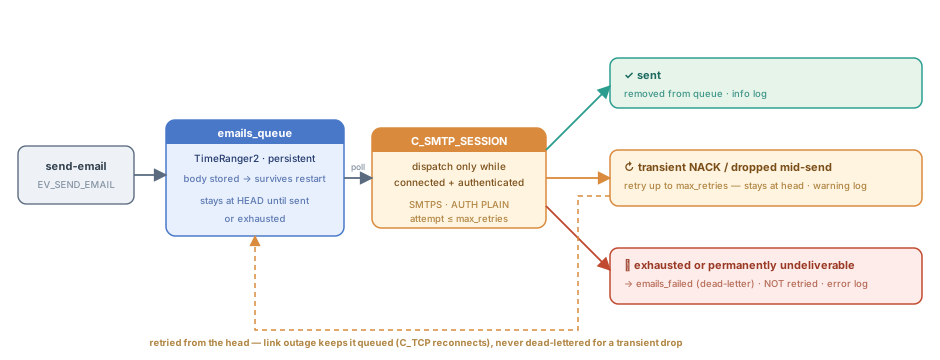
A queued message stays at the head until it is sent or its attempts are
exhausted; a transient failure retries, a link outage just waits, and only
exhaustion or a permanent error moves it to the emails_failed dead-letter.
Outgoing messages are held in the persistent emails_queue and are never
dropped while waiting:
A message is only dispatched while the SMTP session is connected and authenticated. If the server is down or the URL is wrong, the message stays at the head of the queue, and the session tries again, paced (see Pacing); delivery resumes once the server is back. Nothing is dead-lettered, and no retry is spent, because the server cannot be reached or fails before the mail transaction.
Rejected credentials stop the yuno instead. When the server refuses the
AUTH PLAIN, the emailsender logs one ERROR (“SMTP credentials rejected: exiting, NOT relaunched”, with the replycode,urlandusername) and exits with code 0, so neither the watcher nor the agent relaunches it. A retry would only repeat the refusal, and a mail provider bans the address that keeps failing its AUTH: OVH did, for its whole mail cluster. The in-flight message stays at the head ofemails_queue, without spending a retry. Fix the credentials (set-email-user, or the config) and run the yuno again:ycommand -c 'command-yuno id=<id> service=emailsender command=set-email-user username=<user> password=<password>' ycommand -c 'run-yuno id=<id>'The agent runs enabled yunos again when it restarts and on
deactivate-snap, so with the credentials still wrong each of those costs exactly one more attempt, never a loop.A
334toAUTH PLAIN(the server wants the response on a line of its own, RFC 4954) is answered once with the same credentials; a second334stops the yuno the same way (“SMTP server does not take AUTH PLAIN”). So does a5xxto the greeting or to EHLO (“SMTP server refuses this client”, a provider that blocked the address): no credentials are sent, and every attempt would be refused.The body is persisted as part of the queued message (a string), so it survives both retries and a yuno restart.
A pause (or the stop of the yuno) with a message in flight leaves it at the head of
emails_queuewithout spending a retry; the next play sends the queue again, also when it comes right after the pause.Delivery is at least once, not exactly once. A message is done only when the server answers
250to the final.of its DATA. If that answer does not reach the session -- the connection is lost after the.was sent, the250does not come withintimeout_response, the reply line is malformed, or the yuno is paused, stopped or killed in that instant -- the server may have taken the message, and the emailsender cannot know. The message stays at the head of the queue and is sent again, so the recipient can get it twice (RFC 1047, Duplicate messages and SMTP). A pause, a stop or a kill spends no retry; the others spend one, and when it was the last one the message goes toemails_failedthough it may have been delivered.A message stays at the head of the queue until it is either sent or its attempts are exhausted. A transient send failure (server NACK, connection dropped mid-send) is retried up to
max_retriestotal attempts.When
max_retriesis exhausted — or the message is permanently undeliverable (missing recipient, un-encodable body, a5xxto every recipient, to DATA or to its end) — it is moved toemails_failedand removed from the main queue. The dead-letter queue is not retried automatically.
Every outcome is logged: a warning per retry, an error when a message is moved to the dead-letter queue, and an info line on success.
Pacing
No failure is retried at once. After a failed session or connection -- a
4xx to the login or to the message, the default sender refused at MAIL
FROM, a 4xx or 421 to the end of DATA (a rate limit, a
greylist), a reply that never comes, a malformed reply, a server that closes
the connection by itself, a connection that is refused, times out, or whose
TCP connect or TLS handshake does not end within timeout_response -- the
next connection waits timeout_retry ms, twice as long after each further
failure in a row, up to timeout_retry_max. An email queued during the wait
waits for it too, and so does a pause and a play. A session that ends with no
failure (a message delivered, an idle session closed) starts the doubling
again, and a message waiting then connects as soon as the transport is down.
Nothing connects with nothing to send, not even at the start: the transport
never connects by itself. A url changed (set-url-from and a pause and a
play) starts the pacing afresh. timeout_retry and timeout_response below
1000 ms, and timeout_retry_max below timeout_retry, are refused with an
ERROR and the default taken.
A message the server refuses with a 5xx (every RCPT TO, DATA or the end of
DATA: 550 5.1.1 no such user, 554 content refused) is the message’s
fault, not the server’s. It goes to emails_failed, tried once, and the
session goes on: it sends RSET and the next message goes on the same
connection at once (a server that refuses RSET is told QUIT, and the next
connection waits timeout_retry). No paced delay, no “SMTP server
failing” -- for the first two refusals in a row. From the third refusal with
no delivery between them, the server is refusing every message (a blocked
account, a quota): each refusal still sends its message to the failed queue,
but drops the session as a failure, the next message waits the paced delay,
and the run is said once (“SMTP server refused the last messages in a row:
each goes to the failed queue, the next ones are paced”, with
refused_in_row), with no ERROR of timeout_failing_alarm: the emails are
not stuck. Every refusal counts, a bad address and a sender of the message’s
own included, so a queue refused one by one never gets a login per message;
a good email behind such a run waits the paced delay until the next
delivery. A batch of refused messages costs one attempt each, at the paced
rate.
A 5xx to one recipient of several refuses that recipient only: the message
goes to the others, each refused one a WARNING, and the “email sent” line
says who got it -- to and cc hold the accepted addresses, refused the
refused ones, the bcc only as counts (bcc_count, refused_bcc_count).
A refused sender (MAIL FROM): the reply decides, not the from -- most
producers set a from of their own, and an account block answers them all
alike. It is the MESSAGE’s only when its sender is its own (not the
configured default, compared ignoring case) and the reply is about the form
or the existence of that address: a 501, a 5.1.7 status, or a 5.1.8 /
553 whose text says the domain or the address does not exist (553 5.1.8 <a@b>: Sender address rejected: Domain not found). Then it goes to the
failed queue once, with a WARNING naming the from, and the session goes on.
Everything else is the account’s, quoted or not -- Postfix quotes the address
in every sender reject: any 5.7.x (a quota, 554 5.7.1 <a@b>: Sender address rejected: Access denied), a 5.1.8 that does not say the address does not
exist (550 5.1.8 Access denied, bad outbound sender), a 4xx, the default
sender. It is paced like a failure and charged to the message as a retry, so
at most one email goes to the failed queue per max_retries cycle, the queue
moves on, and a head stuck past timeout_failing_alarm raises the ERROR.
Every attempt refused resolves the message or spends a retry. To move the
email at the head of the queue to the failed queue at once:
ycommand -c 'command-yuno id=<id> service=emailsender command=skip-email'Providers ban the addresses that hammer them (OVH did, for its whole mail cluster), so this is a hard rule, not a tuning knob: whatever the server answers, connection after connection, the yuno never logs in faster than the paced delay -- refused logins and refused clients stop it, and refused messages cost one attempt each.
A failing server is said, while an email waits: a WARNING at the first
failure (“SMTP server failing: emails wait, the retries are paced”, with
its cause, a refused connection included), an ERROR once it has failed for
timeout_failing_alarm (1 h by default) and again at most once per that
period, and an INFO when it ends -- at the first delivery (“SMTP server works
again”), or, for a streak of connections and handshakes only, at the next
handshake that works (“SMTP server answers again”). A session closed with
no failure ends a streak too. To be told after 15 minutes instead:
"kw": {
    "timeout_failing_alarm": 900000
}
A message spends one of its max_retries only when it fails in its own
transaction (its first RCPT TO onwards), or when the default sender is
refused at MAIL FROM. A failure before -- the connection, the greeting,
EHLO, a transient AUTH (454) -- spends none: the server never saw the message, and it waits, paced, for as long as
the outage lasts.
The wait after the k-th failure in a row is timeout_retry × 2^(k-1), capped
at timeout_retry_max: with the defaults 2, 4, 8, 16, 32, 64, 128, 256 and
512 s, then 600 s after every further failure. Every failure of the session
counts, of any message and of any kind, one that spends no retry too; a
message refused with a 5xx counts nothing for the first two in a row, and
a step each from the third on.
The count
starts again only after a delivery, or after a session that ends with no
failure (an idle session closed). Moving a message to emails_failed does
not reset it. So with the defaults (max_retries 4), against a server that
answers every message with a 4xx:
| Message | Wait before its first attempt | Waits between its four attempts |
|---|---|---|
| the first after a delivery or a start | none | 2 + 4 + 8 = 14 s |
| the second | 16 s | 32 + 64 + 128 = 224 s |
| the third | 256 s | 512 + 600 + 600 = 1712 s (28.5 min) |
| the fourth and later | 600 s | 3 × 600 = 1800 s (30 min) |
The connection and the session of each attempt add their own time. A batch
config for a provider known to refuse messages for long raises max_retries:
with max_retries: 10 the waits of the first message add up to 1022 s (about
17 minutes), and those of a message later in the same streak to 9 × 600 s
(90 minutes):
"kw": {
    "max_retries": 10,
    "timeout_retry": 2000,
    "timeout_retry_max": 600000
}Debugging
Trace levels (enable with
ycommand command-yuno id=<id> service=__yuno__ command=set-gclass-trace gclass=<G> set=1 level=<L>):
| GClass | Level | Shows |
|---|---|---|
C_EMAILSENDER | messages | The MIME message dispatched to the SMTP child |
C_SMTP_SESSION | smtp | SMTP FSM phases — commands sent (>>>) and reply codes (<<<) |
C_SMTP_SESSION | traffic | Raw bytes in/out (hex dump) |